![FinPro logo full color (1).png]](https://help.finpro.us/hs-fs/hubfs/FinPro%20logo%20full%20color%20(1).png?height=27&name=FinPro%20logo%20full%20color%20(1).png)
1. I was using Institution Provided Thresholds for previous quarters but I can't click generate for this quarter.
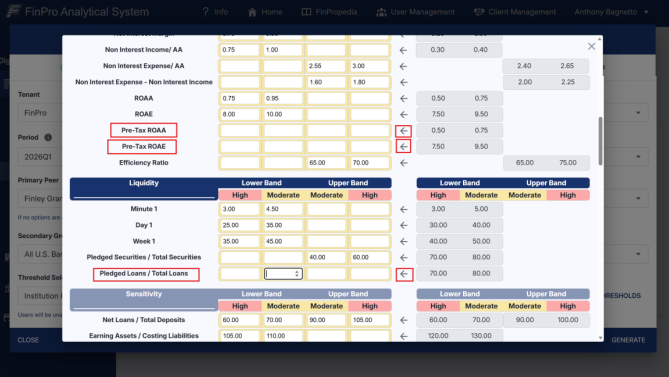
The April 2026 and July 2026 update of scorecard included the addition of 6 new Thresholds.
-
Pre-Tax ROAA
-
Pre-Tax ROAE
-
Pledged Loans/Total Loans
-
Traditional Deposits/Total Deposits & Total Borrowings
- Tier 1 (Core) Capital / Total Assets
- Common Equity Tier 1 (CET1) Capital / Risk-Weighted Assets
These Thresholds need to be populated in order to click generate and move to next steps. You may use the left arrow to pull over FinPro Thresholds or choose your own
2. My Primary Peer Groups are empty for this new quarter. I want to use ones I created previously.
-
Primary Peer groups must be re-created for every new quarter. For your conveinence, you may clone previous quarter Peer Groups for use in the new quarter. Please visit CLONING A PEER GROUP for instructions.
- NOTE: Peer Groups MUST be between 8 and 20 Instructions. Peer Groups will NOT save if they are outside this range.
3. Pop-Up Blockers
To ensure Scorecard Dashboards and PowerPoints open properly:
- Make sure your browser's pop-up blocker is disabled. Pop-ups are often used for login screens, form submissions and other key features.
- You can disable pop-up blockers by going to your browser's Settings>Privacy/Security>Pop-ups (exact path may vary by browser).
4. Will my FinPro MFA information automatically transfer to my new device?
- If you get a new mobile device, your Multi-Factor Authenticator information will not automatically transfer over.
- Please reach out to FinPro's Customer Service to have your MFA details reset.
5. What is the difference between Dashboards and PowerPoints?
- Dashboards in Scorecard and Scorecard Plus are available for viewing only - they cannot be downloaded.
- PowerPoints can be both viewed and downloaded, so you can save or share them as needed.
6. How do I know when a PowerPoint report has finished loading?
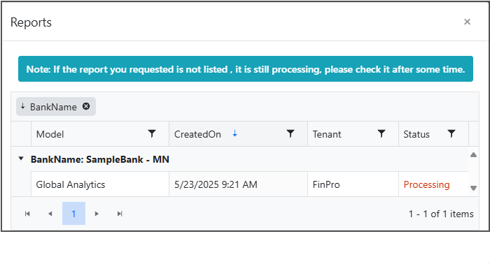
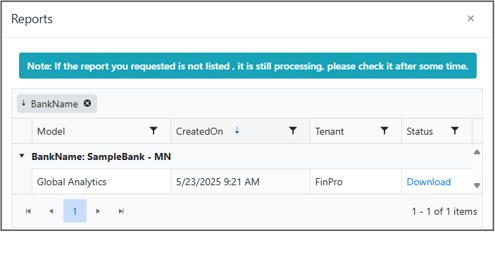
- Keep an eye on the reports you are running within the REPORTS icon - reports will update status as they process and complete.

7. What information do I need to run a model?
- All necessary or required fields for each model can be found in the parentheses next to the drop downs on the left-hand side.
- As an example, if you would like to run a Peer Analytics Dashboard:
- On the left-hand side, select and fill out: Periods, Institution, and Primary Peer
- On the right-hand side, choose the model you would like to run: Peer Analytics
- Once all fields are filled, click the blue "Generate Dashboards" button
- As an example, if you would like to run a Peer Analytics Dashboard:
8. Why don't I see any checkboxes under Dashboard and PowerPoint?
- If there are no checkboxes, it means you do not have the necessary permissions to run the models.
- Reach out to your company's admin user to confirm your access and request the appropriate permissions.
9. Can I export the excel Models and download?
- The Scorecard models are unavailable for export or download. You may view and edit the models within your browser.
10. Why should I use the Live Chatbot, Penny?
- Penny is our helpful virtual assistant who pulls answers directly from our internal Knowledge Base.
- If your question is covered in one of our Knowledge Articles, Penny will send you directly to the exact section.